Showing posts with label Reviews. Show all posts

18 Oct 2013

Elon Musk Purchased James Bond Submarine Car For $886k

It has been reported this week that the serial entrepreneur and current CEO of Tesla Cars Elon Musk, has purchased the iconic James Bond submarine car for an estimated $886,000 with plans to fit an electric motor into the shell and transform it into a transforming submarine car.
Unfortunately the iconic James Bond submarine car used in the movie “The Spy Who Loved Me” is basically just a film prop and does not contain any submarine components or the ability to transform from a car and was guided underwater by a stuntman equipped with scuba gear for the film’s action sequences.
James Bond Submarine Car
Yesterday a Tesla Motors spokeswoman confirmed that the submarine movie prop, modelled after a Lotus sports car, had been bought by Tesla (TSLA) CEO Elon Musk. Who is now looking to transform the movie prop into a fully working transforming submarine car equipped with an electric motor. In a statement provided by Tesla Elon Musk explained:
“I was disappointed to learn that it can’t actually transform,”-”What I’m going to do is upgrade it with a Tesla electric powertrain and try to make it transform for real.”
It will be interesting to see whether the billionaire entrepreneur will be able to transform the iconic James Bond car into a real-life working model similar to that which allowed Roger Moore to drive the Lotus Esprit off a pier and into the water and then transform it into a submarine to then drive it back out onto a beach under the gaze of bemused sunbathers.
James Bond Submarine Car
Source: CNN

7 Oct 2013

Samsung Galaxy Gear Gets Reviewed (Video)


Samsung recently launched their Galaxy Note 3 smartphone, and their Samsung Galaxy Gearsmart watch, and now we have a video review of the Samsung Galaxy Gear from the guys over at Sammobile.
The video below gives us a good look at Samsung’s new Samsung Galaxy Gear, which Samsung are saying is going to be the next big thing.
Samsung Galaxy Gear
The Samsung Galaxy Gear can be used to communicate with your Samsung Galaxy smartphone or tablet, at the moment, the Galaxy Note 3 is officially supported, although we have seen the device working with other Galaxy devices, and more will get official support shortly.
The Galaxy Gear features a single core 800MHz processor and comes with 512MB of RAM plus 4GB of built in storage, the device also features a 1.9 megapixel camera which is located in the devices strap.
The Gear also has a 1.63 inch AMOLED display that has a resolution of 320 x 320 pixels, the device can be used for answering calls, texts, emails and more.
Samsung are also working on other versions of the Galaxy Gear, the company is rumored to be working on a cheaper version of the device and also the Galaxy Gear 2.
It will be interesting to see how well the device does, Samsung will have more competition soon, as Apple and Google are also working on smart watches.
Source Sammobile

4 Oct 2013

Ads officially coming to Instagram


Instagram announced on Thursday that ads are finally coming to the social network. Facebook paid $1 billion in cash and stock for the site in April 2012 when the deal was announced, Many analysts wondered how Facebook would turn a profit on the acquisition. The answer is ads.
Instagram
On Thursday, Instagram revealed that the monetization of the site will start slowly. There will be “a focus on delivering a small number of beautiful, high-quality photos and videos from a handful of brands that are already great members of the Instagram community.” If an Instagram user sees an ad they don’t like, the ad can be hidden and feedback sent explaining why the user didn’t like the ad.
So ads are coming and at least you have been warned.
Source Phone Arena

3 Oct 2013

Android 4.4 KitKat Poses For The Camera


The guys over at Gadget Helpline have managed to get their hands on the latest version of Google’s mobile OS, Android 4.4 Kit Kat, and have posted a number of photos showing some new features in Android 4.4 Kit Kat.
Android 4.4 KitKat is expected to be released later this month, the first handset that will come with the latest version of Android is Google’s new Nexus 5.
android 4.4 KitKat
The build in the photos is apparently an earlier version of Android 4.4 KitKat, as there are references to Key Lime Pie, which was what Android 4.4 was going to be called before Google teamed up with Nestle to call it KitKat.
android 4.4 KitKat
Head on over to Gadget Helpline and have a look at some more photos of this early build of Android 4.4 KitKat, it isn’t clear as yet how much the OS will change when the final version is released later this month.

1 Oct 2013

Google Web Designer Beta Launches For HTML 5 Creativity (video)


Today Google has launched a new beta version of their free Google Web Designer tools which they have designed to help you create HTML 5 pages with ease.
Google Web Designer is still in its bets development stage but has been built to help create animated HTML5, with a robust, yet intuitive set of design tools allowing designers to view and edit the code behind your ideas.
HTML 5
The new Google Web Designer also allows you to easily add creatives seamlessly for DoubleClick and AdMob to your HTML 5, or publish them to any generic environment you choose. Watch a speed demo below of the new Google Web Designer tools after the jump to give you a brief glimpse at what you can expect from the software.
Google explains: “By now, it’s evident that multi-screen consumption is the way of the future; mobile and tablet devices are becoming consumers’ first screens, so the content that is developed needs to work seamlessly across these screens. There are already more end-users in HTML 5-compatible environments than there are in Flash-compatible environments, and HTML 5 ad spend is expected to overtake Flash spend within the next two years. But until recently, advertisers didn’t have the tools they needed to easily develop content fit for today’s cross-screen experiences.”
To learn more about the new Google Web Designer HTML 5 software jump over to the official website to download a free copy and start creating.
Source: Google

16 Sept 2013

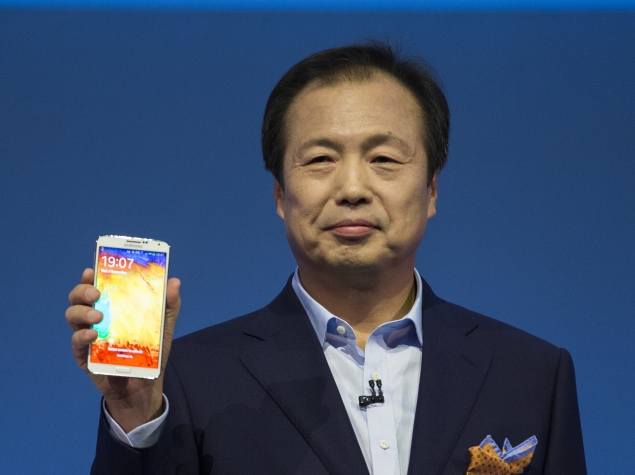
Samsung Galaxy Note 3: First impressions


samsung-galaxy-note-3-screen-635.jpg

Samsung is giving its latest Galaxy Note smartphone a stylish makeover.
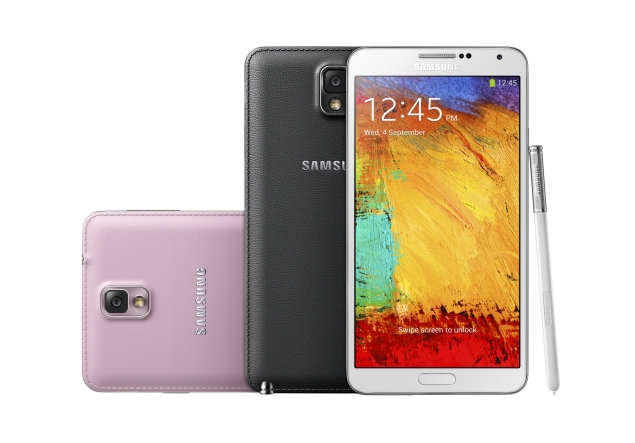
The Galaxy Note 3, unveiled Wednesday, has a soft, leather-like back. It feels like you're holding a fancy leather-bound journal. Grooves on the side of the big-screen phone make it easier to grip.
But I found the new phone to be complicated to use. There's too much going on. Between Scrapbook, My Magazine, Air Command and dozens of other functions, it might take even the most experienced smartphone user several hours to figure out.
I tested out the Note 3 for about 45 minutes Wednesday at a Samsung press event in a New York hotel. The company also unveiled its next tablet, the Galaxy Note 10.1, which is basically an extra-large version of the Galaxy phone, but without the cellular service. The phone and its pen were both tied down to a table with a security device, so I was hampered testing it out. A colleague spent several minutes with the tablet and was likewise hampered.
But I saw enough of the Note 3 to at least like its look and feel.
With its leather-like back and the stitching around it, the phone feels expensive and well made in my hands. The soft back can be snapped off the phone to reveal the battery. Samsung will sell replaceable back covers in several different colors, but the phone itself will come in just three: black, white or pink.
galaxy-note-3-different-colours-635.jpg
The Note 3 has a bigger screen than its predecessor, measuring 5.7 inches (14.5 centimeters) diagonally compared with the Note 2's 5.5 inches (14 centimeters). But it still weighs less (5.9 ounces (167 grams), compared with 6.4 ounces (182 grams)) and is slightly thinner (at 0.33 inch (8.4 millimeter) rather than 0.37 inch (9.4 millimeter)).
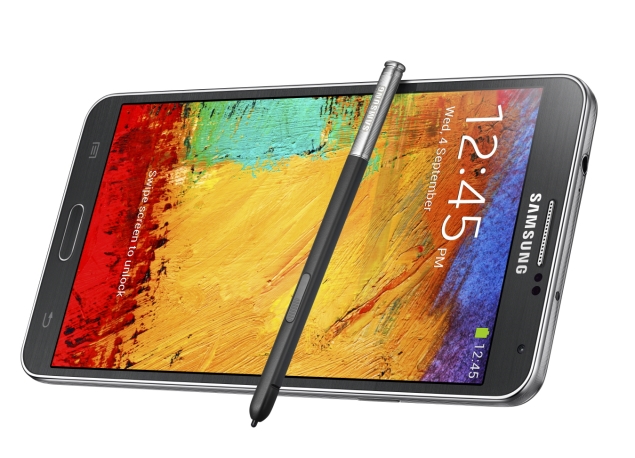
The biggest changes are with the S Pen. The pen unlocks a new feature called Air Command. With that, you can open five other features:
  • With Action Memo, you can handwrite a note.
  • Scrapbook lets you circle content you like, such as a YouTube video or a news article. It automatically saves and organizes the content into a format that's easy to scroll through. Scrapbook, with its boxy format, looks a lot like social media site Pinterest.
  • Screen Write captures a screen and allows you to write comments on that captured image.
  • S Finder is the phone's search engine, to find chat messages, documents or other content on the phone.
  • Pen Window, the most promising of the five, lets you access one of eight apps by drawing a box of any size on the screen. Let's say you're on a Web page and need to calculate something. You can open Air Command, then Pen Window. Draw a box on the screen, and eight icons pop up. You then click the one for the calculator. Pen Window currently opens a limited number of applications: calculator, clock, YouTube, phone, contacts, a Web browser and two separate chat apps - Samsung's ChatON and Google's Hangouts. (Two different ones? Did I mention the phone's complicated to use?) It's possible Pen Window will support additional apps later.
I couldn't figure out how to open Air Command on my own. During a presentation beamed into the New York hotel's TV sets from Berlin, where Samsung unveiled the device, a company executive said pointing the pen to the screen was all it took to open Air Command. That wasn't the case. A Samsung representative in New York showed me how to use it. I learned that I had to click the S Pen's button while hovering over the screen to get to Air Command.
Another new feature, My Magazine, was also hard to find. My Magazine was developed in partnership with Flipboard, an app that pulls content from news sources and your social media accounts and presents it in an easy-to-read magazine format. My Magazine does the same thing. It is customizable, pulling news content from various news sources based on subjects you want to follow, such as business or food related articles. You can also sync it with your Twitter, Facebook, Instagram, Tumblr and other social media accounts. My Magazine is well designed and is a place where you can easily catch up with all your social media accounts and news in one place.
But first I had to find it. A representative had to show me that an upward swipe at the bottom of the screen opens it up.
The redesigned S Pen is tough to use. It is small and thin, making it hard to grip. Not surprisingly, the button on the stylus was quite small, too. You end up spinning the pen around every time you need to click it. The phone and tablet is very geared toward the pen, rather than pinching and swiping with your fingers as with other phones such as Apple Inc.'s iPhone and even Samsung's flagship Galaxy S4.
I had no problem converting my handwritten phone numbers into digital contacts on the phone. But my colleague, who admits she has messy handwriting, says the tablet had trouble reading it.
The phone's screen is crisp and very clear. I watched several YouTube videos and a preview for "Iron Man 3." The bigger screen makes watching video a joy, and I can see myself watching movies on it instead of a tablet. The new phone's screen resolution is far better on the Note 3 - at 386 pixels per inch rather than 264 on the Galaxy Note 2. (By comparison, the iPhone 5 is at 326 pixels per inch.)
The phone's 13 megapixel camera took clear shots, but it was slower than I'm used to on my iPhone 4S, the model from 2011. A processing alert pops up for a second while a photo is saving.
The Galaxy Note 10.1 tablet, also unveiled Wednesday, has the same features of the Note 3 phone, just with a bigger, 10-inch (26-centimeter) screen. Like the phone, it has the leather-like backing and grooves on the side.
The tablet has a few extra bells and whistles. One of the big perks is the tablet's file organization system, which is similar to that of a traditional personal computer. It lets you create folders and sub-folders for documents, providing easy access. Also like a PC, the tablet lets you create up to eight profiles, so you can let your kids, spouse or guests use the tablet without fear that they will read your email, delete your photos or access apps you don't want them to.
The tablet also comes with a host of freebies that the phone doesn't have, including free trial subscriptions to The New York Times, Bloomberg Businessweek and other news sources, along with extra space with online storage service Dropbox.
The tablet's display is bright and clear, good for watching TV or viewing photos. It also has stereo speakers and cameras on both its front and back sides.
Samsung said the phone and tablet will ship worldwide in most countries on Sept. 25, but it will come later in the U.S. Samsung didn't say when, other than some time before the holidays. The company also didn't say how much the devices will cost.
I'm eligible for a new phone upgrade on my Verizon Wireless contract. I was waiting to see if Apple Inc. will launch a new phone this month. But after testing out the Note 3, I'm considering both. I need more time with the Note 3, though, to figure it all out.

Sony Xperia Z Ultra review


sony-xperia-z-ultra-635.jpg

"Maybe Dell was ahead of its time."
No, that's not a typo, we did mean to write Dell. When we first saw the Sony Xperia Z Ultra, we couldn't help but think back to the Dell Streak, a 5-inch device announced back in 2010 as a "tablet that can make calls." While calling 5-inch devices 'tablets' seems ridiculous now, in the pre-Galaxy Note era, people had a different mindset about display sizes that were acceptable on a device that's designed to sit in your pocket. The Dell Streak was almost universally panned, and while the poor execution probably had as much to do with it, as the size of the display itself, it's fair to say that the Dell Streak would probably get a more favourable reception now, and in fact, may even be called 'not big enough' by some!
Yes, that's how radically the landscape has changed in the last three years, and it is in this world that the Sony Xperia Z Ultra makes its debut. While we are personally no fans of ultra large-screen phones, we realise a market exists for such devices, even if the likes of Xperia Z Ultra and Huawei Ascend Mate are intent on stretching the acceptable limits.
So, has the Sony Xperia Z Ultra gone too far, or does it tick the right boxes? Let's find out.
Design/ Build
At first glance, the Sony Xperia Z Ultra looks like a slab of premium chocolate - it sports the same rectangular design, and is about the same thickness, and the Black colour variant looks especially biteable. Pick up the phone and try getting your fingers around the width of its display and you realise that the phone just about fits in your hand, if you have big hands that is. If you have a tiny frame, forget about trying to get your fingers around the sides of this monster. Don't even think about trying to operate the phone with just hand, unless you have it resting on a surface.
The Xperia Z Ultra is a big phone, which stretches the definition of the phrase big phone. At 179mm, or an incredible 7.05-inches long, even those with large hands will be unable to fit the length of the phone in one hand. If you plan to, say, watch a movie on the phone in landscape mode, forget about snuggling this behemoth in one hand - putting both your hands to use is a must.
Once you get past the sheer size of the phone, you realise that the Xperia Z Ultra is one solidly-built device. The phone has a plastic body built around a metallic frame, which lends it an air of solidity, and a premium feel when holding the device. At just 6.50mm thin, Xperia Z Ultra is sleek, and indeed the 'slimmest full-HD smartphone', as Sony loves to claim. In a phone that's super-sized on everything else, this comes as a very welcome change.
Carrying the Sony Xperia Z Ultra is a challenge of its own. Some may be able to fit it in the front pocket of their trousers or jeans, but will have to take it out if they want to sit without being constantly poked. Keeping it in the back pocket is an option, but the Ultra is sure to stick its neck out - and beware of accidentally sitting down with the phone still in your pocket!
sony-xperia-z-ultra-sides.jpg
The left edge of the Xperia Z Ultra has the dock connector in the middle and the Micro-USB port towards the top. Since the Xperia Z Ultra is a waterproof phone (a claim we were not tempted to test), the Micro-USB port and the microSD and Micro-SIM slots (present on the right edge) are protected by flaps. The right edge also houses the power button (in the middle) and, right below it, the volume rocker. The power button is a circular, metallic button also seen on the Sony Xperia Z and the Sony Xperia Z tablet. While the design makes the power button stand out visually, it also greatly reduces the target area of the button, and we would've preferred a larger button made of plastic.
sony-xperia-z-ultra-power.jpg
Display
The Sony Xperia Z Ultra comes with a 6.44-inch full-HD display with a resolution of 1080x1920 pixels. While the pixel density takes a hit due to the humongous screen size, at around 340ppi, most won't notice the difference in the quality of text and images, though the display is definitely not as sharp as the one seen in, say, the HTC One.
Outdoor visibility of the Xperia Z Ultra is about average, and at times we were definitely wishing we could take the brightness a notch higher, even when at full brightness. Viewing angles are good.
sony-xperia-z-ultra-12-635.jpg
Sony has put the extra real estate on the Xperia Z Ultra to good use, with a strip at the bottom housing the three on-screen Back, Home and App Switcher buttons, and still leaving more than enough space for content. One side-effect of the Xperia Z Ultra's extra-large display is that at times the content looks odd when scaled up. For example, in the official Twitter app the four columns appear extra-wide.
While the Sony Xperia Z Ultra does not bundle a stylus, the screen will recognise taps from a stylus, or even a pen or a pencil, if you prefer to use your device in that manner.
Camera
The camera on the Sony Xperia Z Ultra is a bit of a mixed bag. The images look good on the phone's display or when you are viewing images at the default zoom level. However, zoom in to 100 percent and you'll notice that the objects lack detail that even our two-year old iPhone 4S was able to capture. This problem gets accentuated when clicking pictures in macro mode.
DSC_0010.jpg
However, the low-light and indoors performance of the camera is better than what we've seen in most phones, though the Xperia Z Ultra won't have the leaders of the pack in the category, the iPhone 5and Nokia Lumia 925, looking over their figurative shoulders.
The Ultra comes with a comprehensive camera app, with presets and settings for pretty much every conceivable situation. The phone takes good, fast panorama photos and comes with an unlimited burst mode. The phone does not come with a flash, which is a rather glaring omission.
DSC_0008.jpg
The Xperia Z Ultra captures good quality video, with the ability to zoom in and out, and capture high-resolution stills as the video is being recorded. The microphone is pretty sensitive, and able to capture distant sounds while recording outdoors.
Software/ User interface
The Sony Xperia Z Ultra runs Android 4.2.2 Jelly Bean and we reviewed our unit after installing therecent firmware update carrying build number 14.1.B.0.471.
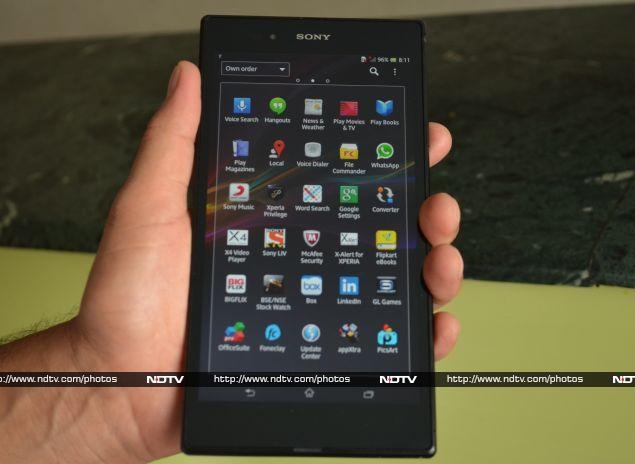
The Ultra is quite heavy on skinning, customising stock apps and adding a number of pre-installed apps. Like other devices in the Xperia series, you have WALKMAN (for Music), Album, and Movies for media consumption, all with additional functionality and UI touches from Sony. Other pre-installed apps on the Xperia Z Ultra include Socialife (A Flipboard-like app from Sony), TrackID (Sony's answer to Shazam), Wisepilot for XPERIA (GPS-based navigation app), File Commander (a file explorer), Voice Dialer, Word Search, Converter, X4 Video Player (lets you play four videos simultaneously), McAfee Security, Foneclay (live wallpapers), PicsArt (photo editor), Smart Connect (perform actions when certain accessories are connected), X-Alert for XPERIA (Sony's anti-theft solution), Notes, and Drag&Share. The list of bundled apps doesn't end there, with popular apps like Facebook, Chrome, YouTube, WhatsApp, Box, and LinkedIn thrown-in for good measure.
If all that isn't enough, Sony has included a bunch of other apps on the Xperia Z Ultra that offer you access to yet more apps and content. Sony Music gives you free unlimited streaming and downloads from Sony's music catalog of Bollywood, international and classical music for a period of 6 months. Sony Select and appXtra showcase popular Android apps, while Xperia Privilege promises special offers for Xperia owners. One of the more useful ones is GL Games, which showcases games by popular developer Gameloft, with popular titles like Asphalt 7: Heat (usually $0.99 or Rs. 55) offered for free to Xperia Z Ultra owners.
sony-xperia-z-ultra-13-635.jpg
The Indian edition of the Sony Xperia Z Ultra also comes with apps like Sony LIV (free streaming of popular TV programmes from Sony, SAB and MAX), Flipkart eBooks (free eBooks worth Rs. 2,000 bundled), BIGFLIX (with free unlimited streaming of Bollywood and regional Movies for one month), and BSE/NSE Stock Watch. That's a lot of pre-installed apps, and while some of them can be removed, the others will stay with you for good, should you have any use for them or not. We wish Sony had instead pre-installed a single app that offered users the opportunity to download apps it wishes to offer, letting users choose which apps they want.
As mentioned earlier, Sony Xperia Z Ultra runs Android 4.2.2 Jelly Bean, which brings features like lock-screen widgets, enhanced notifications, improved Google Now and more. While Android 4.2 may seem like a disappointment to some, it is hardly a surprise given that the phone was unveiled a day after Google announced Android 4.3, and no phones other than Google's own Nexus devices andGoogle Play editions have received the Android 4.3 update. Sony has promised that the Android 4.3 update is coming before end of this year, but Android 4.4 might be out by then. That, of course, is no reflection on Sony, and merely symptomatic of the problems that plague the Android ecosystem.
Performance/ Battery life
Sony Xperia Z Ultra is powered by a 2.2GHz quad-core Qualcomm Snapdragon 800 processor alongside 2GB of RAM. It's safe to say it is the fastest device we've come across, handling everything that we threw at it with great aplomb. From multi-tasking and switching between apps, to casual as well as heavy duty games, everything was butter smooth.
Browsing the Web is a great experience thanks to the large screen and the power underneath, which means even heavy duty websites render almost instantly. The phone's also great for watching videos and the Ultra plays full-HD video natively. If you do a lot of media consumption, be mindful of the fact that you'll need to use both your hands to hold the phone in landscape mode. Thankfully, the phone doesn't feel too heavy despite weighing 212 grams, since the weight is evenly distributed across its large frame.
sony-xperia-z-ultra-17-635.jpg
We did have a couple of other gripes about our Xperia Z Ultra unit. The call quality was average at best and we felt that the loudspeaker wasn't loud enough during calls as well as while watching a movie or listening to music.
Battery life is another area where the Xperia Z Ultra just about does the job and it should last a full working day with moderate to heavy use. The giant display on the device is a bit of a battery guzzler and power users will likely find themselves reaching for the charger before the day is over.
Verdict The Sony Xperia Z Ultra is a difficult phone to summarise. It gets a lot of things right - it's a scorcher in terms of performance and the big, full-HD display makes for a great viewing experience. However, it's too bulky for most people, and the large display means the battery life takes a hit. The camera performance could've been better too.
At Rs. 46,990, the phone isn't cheap, but that's no surprise given its top-of-the-line specs and performance. Almost everyone we met was excited about the Xperia Z Ultra when they first heard about it or saw it in person. Ten minutes with the phone, though, changed the opinion of 9 out of 10 people and they were calling it 'impractical' in no time. However, the tenth person immediately vowed to get one for himself.

iOS 7: First impressions


tim-cook-ios7-635.jpg
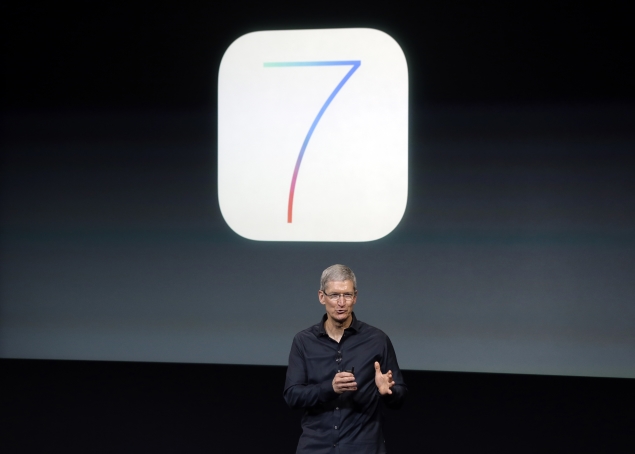
One of the best things about Apple's latest iPhones is the slick new iOS 7 software that runs the devices. But that souped-up operating system could end up hurting sales because the free software upgrade will also work on iPhones released since 2010, giving owners of the older models less incentive to buy Apple's newest products.
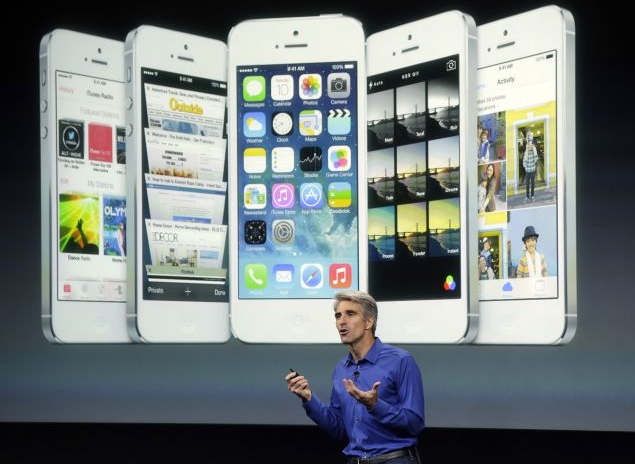
Perhaps unwittingly, even Apple's software boss Craig Federighi alluded to this potential problem while he was bragging about iOS 7 at the company's unveiling of its new phones Tuesday. He predicted that anyone who elects to install the software will feel "like they're getting an all-new device."
I understood what Federighi meant once I was able to see the iOS 7's improvements in action on Apple's two new iPhones, the iPhone 5c and the iPhone 5s. Although Apple announced iOS 7 at a conference three months ago, Tuesday marked the first time the company allowed reporters to experience the software hands-on.
Although the iPhone 5c is less expensive than its predecessor, the iPhone 5, iOS 7 almost made it look fancier than previous generations. As an iPhone 5 owner, I was feeling a bit envious until I remembered that I'll be able to spiff up my device, too, when the software is released on Sept. 18. The operating system will work on the iPhone 4 and later models, iPad 2s and subsequent versions, and the iPod Touch that came out late last year.
iOS 7 looks much different than previous versions of the operating system because it no longer displays iPhone apps as three-dimensional, embossed objects meant to mirror their real-world counterparts. The icons instead are flatter and more colorful.
ios-7-635.jpg
Any significant change in design typically upsets users familiar with the old way of doing things, but I suspect the complaints about iOS 7 will be muted unless there are some terrible bugs in the software that weren't evident during the brief time that I was given to experiment.
I am fairly certain most people who download iOS 7 are going to be pleased. The software makes it easier to navigate around an iPhone and adds some compelling new features.
The additions include the ability to stream music through an advertising-supported service called iTunes Radio and five free apps that used to cost consumers anywhere from 99 cents to $4.99 apiece. The free apps are Apple's photo-editing tool, iPhoto, and video-editing program, iMovie, as well as work-oriented apps called Pages, Numbers and Keynote.
Apple doesn't appear to be removing any popular apps built into the operating system, as best as I could tell. The company did that last year when it replaced Google's mapping app with its own navigation system only to be ridiculed for misguiding users with shoddy directions. Apple isn't bringing back Google Maps with iOS 7, but it is promising that its alternative is getting better.
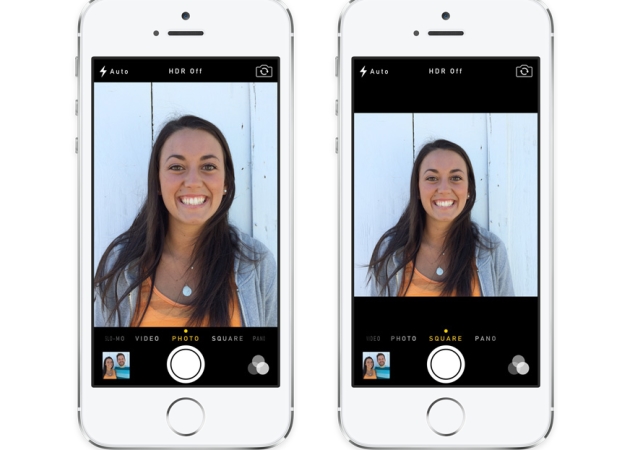
The software upgrade also will make it easier to take better pictures on the iPhone and automatically sort photos into different categories to denote particular events. I particularly liked a feature that lets you control how the camera operates by toggling between options at the bottom of the screen with the swipe of a finger. Once the camera is open in IOS 7, the choices include taking a square, panoramic or standard photo. The bottom-of-the screen controls also include an option to switch to video mode.
iphone-photo-app-635.jpg
When taking a picture in iOS 7, photographers can also choose a filter to use as they snap the photo rather than waiting to touch up the shot later. When shooting video, shots can be zoomed in while recording. I can't do any of that on my iPhone 5 because it is still powered by iOS 6.
The new system also empowers users to access other open apps more easily by clicking twice on the home button. When you do that, the apps are displayed as tiles that can be scrolled across horizontally so you can more easily see and choose several of them.
Apple is also making it easier to access frequently used controls such as and airplane mode by enabling users to pull up the panel from the bottom of the display screen instead of finding and pressing a settings option.
Other than the new software, the iPhone 5c isn't anything special, as one might expect from a cheaper phone.
The only thing that really distinguishes the 5c from the iPhone 5 is that it's housed in plastic instead of aluminum. Some consumers will no doubt like the plastic alternative because it comes in five colors: green, blue, yellow, pink and white. The price also may be more appealing, with the 5c starting at $99 with a two-year wireless contract, a $100 discount from iPhone models released in previous years.
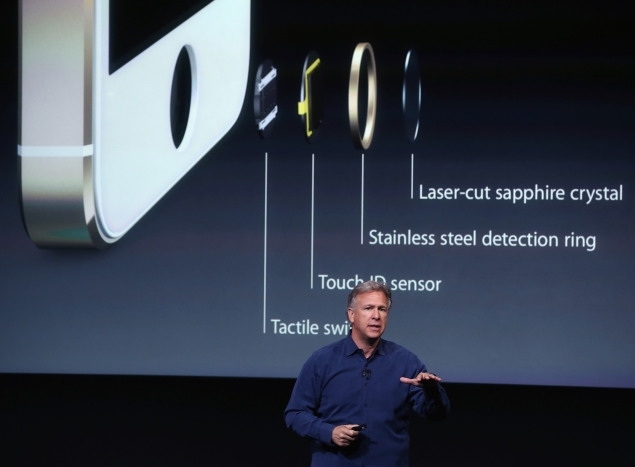
A higher-end iPhone dubbed the 5s boasts several advantages that aren't available on any other model. The coolest innovation allows you to use your fingerprint to unlock the iPhone 5s instead of relying on a four-digit code that has to be repeatedly typed in. The fingerprint reader can also be used to access Apple's apps and iTunes store instead of a password.
Apple CEO Tim Cook thinks the fingerprint scanner will revolutionize technology security. "There is going to be a whole new generation of kids who grow up not knowing what a password is," Cook predicted during a brief discussion with a small group of reporters after he left the room where Apple was demonstrating its new iPhones.
iphone-scanner-afp-635.jpg
I found the fingerprint scanner, called "Touch ID," simple to use during my brief test of the 5s. It just took less than a minute for the phone to record the fingerprint on my thumb, instructing me along the way. Once my prints were in the phone's memory bank, all I had to do was lightly press on the home button when the 5s was locked in sleep mode and it quickly opened.
The 5s also contains a faster processor and technological wizardry designed to take sharper pictures and even record slow-motion video.
Best of all, though, the 5s comes with the iOS 7. I am already looking forward to downloading the software next week so I can simulate what it's like to have a new iPhone for free.

Review: Logitech Rechargeable Speaker S715I


logi.jpg

Introduction
 
Here at the NDTV Gadgets lab we've had a steady stream of iPod docks coming our way for review. We're not complaining though. This time round, we have the Logitech Rechargeable Speaker S715i. We have to say this has to be the most boring name in the history of boring names for gadgets. But nomenclature challenged though it might be, does it packs an aural punch? As a Logitech product, expectations are high, as Logitech has been one of the few budget brands to offer stellar sound quality. Some of the most iconic products developed by the company include the Z-5500 surround sound speakers, which sounded pretty sweet, so some Pink Floyd-esque 'High Hopes' are in order for this one!
 
Design
 
Logitech are no design gurus and most of their products are as bland as they get and the same holds true for the Rechargeable Speaker S715i. The rugged black finish underscores the blandness of the design but, at only 1.5 pounds, it is definitely portable. 
 
The speakers are quite wide which would definitely improve the stereo separation but, as a whole, the façade is reminiscent of the front grill of a sports car. Maybe a Chevy Corvette!
 
On the rear end of the dock we get a kickstand,which frankly feels a tad flimsy, and is quite unstable. The auxiliary port is also housed in the rear, which has a rubberized cover along side the power outlet. Notably there are twin backwards-firing radiators, which act like mid-range, drivers for an added bass thump.
 
The front end of the dock houses the 3-inch neodymium drivers and a pair of half-inch neodymium tweeters. We also get another pair of radiators on the front. All in all we have 8 drivers to push up the sound.
 
In the center, we have the dock connector, which does not support the iPad. Admittedly, the connection feels imperfect as when ever we move the dock even slightly, the iPod moves around as if it were straddled on a rollercoaster ride.
 
The build consists of a combination of plastic and a metallic grill. Nothing very inspiring out here - standard quality plastics are used which are not overly cheap but surely not of the highest quality.
 
Besides this Logitech courteously provides a carry case and a remote control in the packaging.
 
While we are not being overly critical of the build quality considering the price factor, we do have to admit the remote control is distinctly sub-standard, as it feels immensely porky and cheap. Apart from that, we cannot access the functionality of the iPod through the remote and for multiple tasks we had to walk upto the dock and change the controls manually. Not ideal, the lack of functionality of the remote defeats the purpose of having it.
 
Sound Quality
 
In-spite of the pitfalls regarding its questionable build quality, the one area where the S715i excels is sound quality. While many would say the 8 drivers that Logitech promotes heavily are marketing gimmicks, we beg to differ as it offers the best in class sound quality. Heck, its sound quality can go toe-to-toe with the likes of a more expensive Altec Lancing Sound Docks, or the equally priced JBL ONBEAT! And, dare we say it, on lower volumes the sound quality is comparable to the Bose Soundock Classic.
 
Dynamic compression is technology employed by many audio companies, and remnants of dynamic compression can be heard easily. Through Dynamic compression audio manufactures strive to control the total volume of the bass, to reduce the chances of clipping (undesirable distortion) on higher volumes.
 
While the sound goes through an intensive process of dynamic compression, the low-end is considerable. It packs a solid thump, which cannot be said, about any other dock in the price bracket.
 
With the presence of passive radiators on both front and back, the company has equipped the dock with a quality hitherto unheard on the sub-10k iPod docks.
 
The dock reproduces the sound spectrum very ably with the mid-range and the high-end frequencies sounding very balanced. The only clipping problems we encountered were at higher volumes as clipping issues started plaguing the dock along side the dock bleeding treble frequencies in excess.
 
So, for our sound test, we plucked out favorite tracks ranging various genres of music all encoded at 320KBPS. The results were nothing short of spectacular.
 
As always Sweet Child O' Mine was first on our list of test tracks. The Guns N Roses classic has some distinct passages, which make or break speakers. The first is the opening riff of the song, which has a fat overdriven tone and a good speaker will always bring out the harmonic overtones of the guitar riff. The second - the wailing vocals of Axl Rose and the outro Wah-Wah laced guitar solo is the third. The mid-range sounded sweet and the harmonics did not burst our ears drums overall the Logitech Rechargeable dock passed the 'Sweet Child O' Mine' test.
 
Now, on the acoustic Metallica ballad Nothing Else Matters, the jangling acoustic chords were serene and the vocals of James Hetfield were warm and baritone. Even the bluesy outro solo maintained an impressive sonic clarity.
 
We had mentioned that High Hopes were in order for the S715i and so we began testing the Pink Floyd classic. A nuance one has to look out for in High Hopes is the slide guitar solo and the treble response was more than adequate for reproducing this particular facet of the song. Even David Gilmour's husky vocal melodies popped crisply in the mix, giving us an immensely pleasurable dose of psychedelic rock.
 
Besides this, the harsher forms of music - in particular heavy metal - were handled adequately. Be it Dream Theater's Forsaken or Slayer's Eyes of the Insane, the S715i conquered them all. We enjoyed dollops of bass response thanks to the passive radiators in the rear and a tight chugging mid-range, which pumped out the palm-muted riffage of the metal masters. 
 
The only gripe we have with the S715i is the fact at very high volumes the clipping issues become quite apparent even to the un-trained ear, but when the volume is pumped up, admittedly the decibel levels are extremely high, most will not push the dock this hard.
 
One feature that we have not mentioned is the fact that it has a portable battery. Logitech claims it lasts for 10 hours on a full charge but take that with a pinch of salt, it lasted between 6.5 to 8 hours for us - which also is pretty darn good for a dock in this price bracket.
 
 
Verdict
 
So without beating around the bush we would proclaim the Logitech S715i is the best sounding iPod Dock south of Rs10k. While Logitech has stripped it of any aesthetic design flamboyance, it does provide a stunning sonic experience (for the price). Once we couple this with its portable capabilities, it becomes a no brainer for an audio enthusiast.
 
Pros:
 
Sublime Sonic capabilities
Light
Good Battery Life
Amazing Value
 
Cons:
 
Bland Design
Shoddy build quality
Poor remote control functionality
 
 
Ratings:
 
Price: 4
Design: 1.5
Sound Quality: 4.5
Wow Factor: 4

Twitter Delicious Facebook Digg Stumbleupon Favorites More

 
Design by Free WordPress Themes | Bloggerized by Lasantha - Premium Blogger Themes | Affiliate Network Reviews